You’ve spent weeks or months building a beautiful new website. The design is sharp, the copy is dialed, the development is done. You’re about to launch.
But if you skip the SEO fundamentals, your site will be invisible to the people searching for exactly what you offer. Search engines need specific signals to find, understand, and rank your pages. Miss them at launch and you’re starting every ranking battle several months behind. Indexing takes time, authority compounds slowly, and every week your pages sit undiscovered is a week your competitors are accumulating the traffic you should be getting.
The good news is that technical SEO at launch isn’t mysterious. It’s a defined set of steps — most of them small, most of them one-time — that together tell search engines everything they need to know. The companies that outrank you aren’t doing anything magical. They’re doing the basics consistently, and they started on day one.
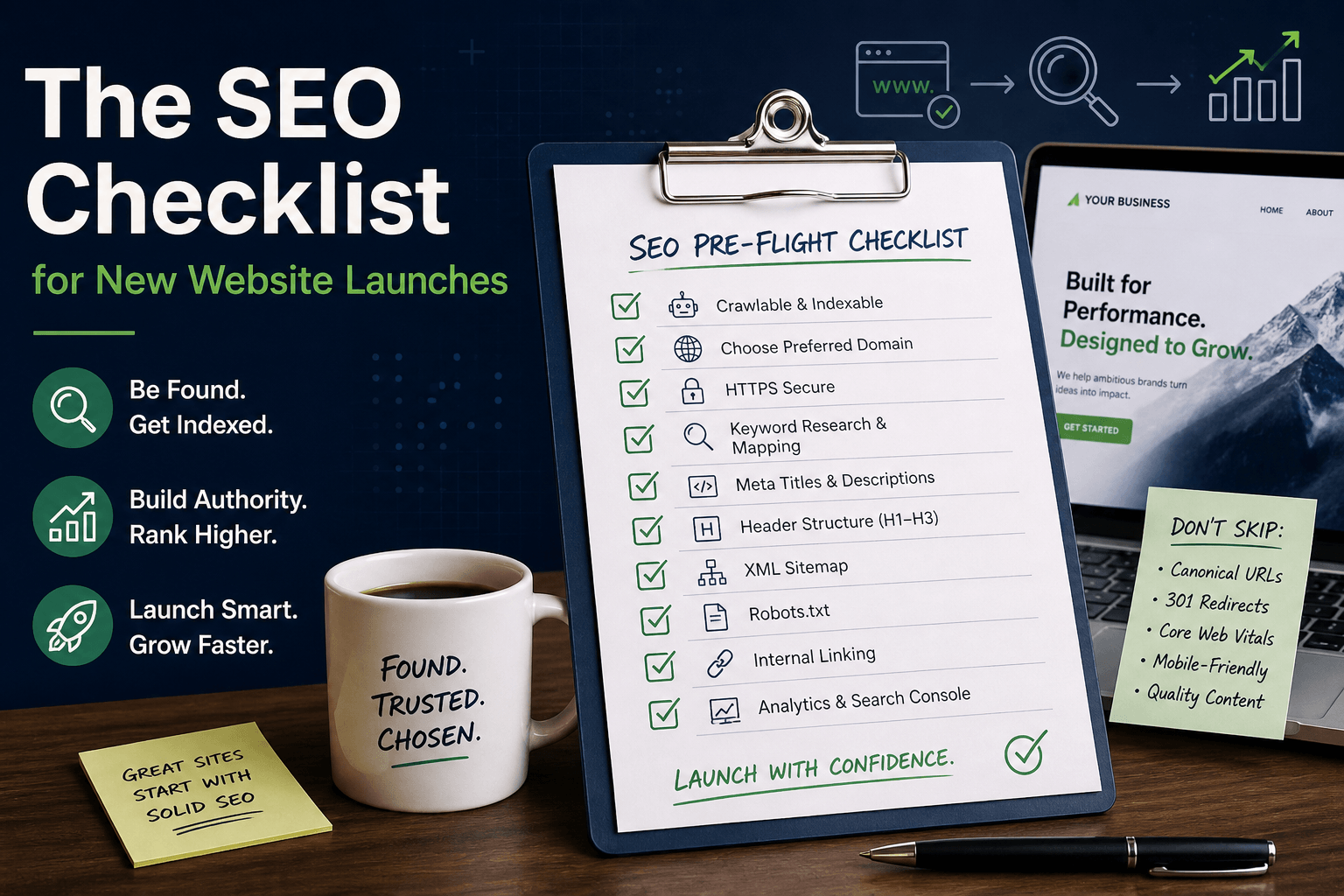
Here’s every SEO task you need to complete before and after launch — in order of priority. Treat this as a pre-flight checklist. Going live without working through it is the kind of mistake that’s invisible at launch and painful three months later, when you realise the site has been indexed under the wrong preferred URL and every backlink you’ve earned is pointing at the version Google doesn’t trust.
Before Launch
The work in this section happens before a single visitor sees your site. It’s the part that’s hardest to retrofit once you’re live, because changing fundamentals after launch means redirects, re-indexing, and potential ranking turbulence. Get it right before anyone’s watching.
Technical Foundation
1. Set up SSL (HTTPS)
Every page should load over HTTPS. Google has confirmed HTTPS as a ranking signal, and browsers flag HTTP sites as “Not Secure.” Most hosts provide free SSL via Let’s Encrypt. There’s no legitimate reason to launch without HTTPS in 2026 — it’s free, it’s automatic on most hosting providers, and the performance overhead is negligible. Check that mixed content (HTTP assets loaded on HTTPS pages) is eliminated, because a single HTTP image in your template will trigger a browser warning that quietly kills trust.
2. Create an XML sitemap
Your sitemap tells search engines which pages exist and when they were last updated. WordPress generates one automatically at /wp-sitemap.xml. For other platforms, use a generator or your SEO plugin.
3. Set up robots.txt
This file tells search engines what to crawl and what to ignore. At minimum:
User-agent: *
Allow: /
Sitemap: https://yourdomain.com/sitemap.xml
4. Install an SEO plugin
For WordPress: Rank Math or Yoast. These handle meta tags, sitemaps, schema markup, and more. Configure the setup wizard before launch.
5. Ensure every page has a unique title tag
Each page needs a unique, descriptive title under 60 characters. Include your primary keyword near the beginning. The title tag is still the single most important on-page SEO element, and it’s also your headline in the search results — so it does double duty as a ranking signal and a click-through driver. Generic titles like “Home” or “Services” waste both jobs. Write them as if they were ad copy.
6. Write meta descriptions for all pages
Every page needs a compelling meta description under 160 characters. Include the primary keyword and a reason to click. Meta descriptions don’t directly affect rankings, but they heavily influence click-through rate, which does. Two pages ranked in the same position can have wildly different traffic depending on how the preview reads. Treat every meta description as a one-sentence pitch to someone who has four other options on the page.
Content and Structure
7. Use proper heading hierarchy
One H1 per page (the main title). H2s for sections. H3s for subsections. Never skip levels. This helps search engines understand your content structure.
8. Optimize URL structure
URLs should be short, descriptive, and include keywords:
- Good:
/ai-solutions/ - Bad:
/page-id-4732/
9. Add alt text to all images
Describe what the image shows. Include keywords where natural. This helps image search and accessibility.
10. Implement internal linking
Every page should link to at least 2-3 other relevant pages on your site. This helps search engines discover content and understand relationships between pages. Internal linking is one of the most underused levers in SEO — it’s free, you fully control it, and it’s how you distribute authority from your strongest pages to the ones you want to rank next. Think of your homepage as the page with the most authority; every link from it to another page is a small vote of confidence that passes some of that authority along.
11. Set canonical URLs
Each page should have a canonical tag pointing to its preferred URL. This prevents duplicate content issues from www/non-www or trailing slash variations. Canonical issues are sneaky — they often don’t show up until you’re a few months in and realise that Google has indexed three versions of the same page and is splitting your ranking signals across all of them. Setting canonicals correctly at launch is five minutes of work that saves a much larger cleanup later.
Performance
12. Achieve passing Core Web Vitals
Test with PageSpeed Insights. Target:
- LCP under 2.5 seconds
- FID under 100ms
- CLS under 0.1
13. Ensure mobile responsiveness
Use Google’s Mobile-Friendly Test. Every page must work perfectly on mobile devices. Google uses mobile-first indexing.
14. Optimize page load speed
Compress images, minimize CSS/JS, enable caching, use a CDN. Aim for total page weight under 2MB. Performance and SEO are now so tightly linked that treating them as separate disciplines is a mistake. A fast site gets crawled more often, ranks better, and converts better — all from the same underlying work.
At Launch
Everything in this section happens on day one, the moment the site is live. It’s the handshake with search engines — you’re telling them “we’re open for business, here’s what to index, here’s where to look.”
15. Submit sitemap to Google Search Console
Create a Google Search Console account, verify your domain, and submit your sitemap. This accelerates initial indexing. Search Console is not optional. It’s the only direct line of communication you have with Google about your site — the place where you see indexing errors, manual actions, mobile usability issues, and the actual search queries bringing traffic to each page. Every site we launch gets Search Console set up before the DNS has even finished propagating.
16. Submit sitemap to Bing Webmaster Tools
Don’t ignore Bing. It powers DuckDuckGo and represents 5-10% of search traffic.
17. Set up Google Analytics 4
Install GA4 tracking. Set up key events: page views, form submissions, CTA clicks. This data will guide your SEO strategy.
18. Test all pages for indexability
Use the URL Inspection tool in Search Console to test that your key pages can be indexed. Fix any issues before they compound.
19. Check for broken links
Use Screaming Frog or a free broken link checker. Fix or redirect any 404s before they get indexed. Broken internal links are a trust signal to search engines that your site isn’t well maintained. They’re also a small but real frustration for users who click expecting something and land on an error. A one-hour crawl now saves you from slowly eroding both machine trust and human patience.
After Launch (First 30 Days)
The first thirty days after launch are the period where search engines form their initial opinion of your site. It’s a window where paying attention matters disproportionately — spotting an indexing issue in week one is a five-minute fix; spotting it in month three means unwinding a problem that’s had time to cement.
20. Monitor indexing progress
Check Search Console’s Coverage report weekly. Make sure pages are being indexed, and fix any errors. Expect the indexing curve to be uneven. Google will pick up your most linked pages first, then gradually work through the rest of your site. If a specific page hasn’t been indexed after two weeks, investigate — usually it’s a robots rule, a noindex tag you forgot about, or a lack of internal links to the page.
21. Build initial backlinks
Submit to relevant business directories, announce on social media, and reach out to partners for link opportunities. Early backlinks accelerate ranking.
22. Publish your first blog post
Fresh content signals to Google that your site is active. Target a long-tail keyword related to your core service.
23. Set up rank tracking
Use Rank Math or similar plugins (if on WP), Ahrefs, or SEMrush to track your target keywords. Monitor movement weekly.
24. Monitor Core Web Vitals in the field
After real users start visiting, check the Core Web Vitals report in Search Console. Lab scores and field scores can differ.
Ongoing (Monthly)
- Publish new content targeting relevant keywords
- Update existing pages with fresh information
- Build backlinks through content marketing and partnerships
- Monitor and fix technical issues in Search Console
- Review keyword rankings and adjust strategy
- Check for and fix broken links
- Review and improve pages with declining traffic
The Priority Order
If you can only do five things before launch:
- HTTPS + unique title tags on every page
- XML sitemap submitted to Search Console
- Proper heading hierarchy and alt text
- Mobile responsive with passing Core Web Vitals
- Internal links between key pages
Everything else matters, but these five will get you 80% of the way there. The rest of the list makes the difference between “ranking” and “ranking in the top three” — but without the top five in place, the rest doesn’t matter. A perfect schema markup implementation on a site with duplicate title tags is a rounding error.
The Bottom Line
SEO isn’t a one-time task — it’s an ongoing practice. But the foundation you set at launch determines how quickly you start ranking. Skip these basics and you’ll spend months wondering why nobody can find your site. The frustrating part is that SEO problems rarely announce themselves. There’s no error message, no failed build, no angry user complaint. Traffic just doesn’t arrive, and it’s easy to blame the market, the copy, or the product — when the real issue is a handful of settings that were never configured.
Do them right from day one, and you give every page the best possible chance of reaching the people searching for what you offer. That’s the entire game. SEO isn’t about outsmarting Google. It’s about making it obvious what each page is, who it’s for, and why it should rank. The checklist above is how you make it obvious.

Bojan Zlatanović
Founder at Norvaris. Building digital products and writing about what actually works in product, engineering, and growth.
More from this author